Metronome
A metronome with subdivisions for steadier practice
Hear the notes between beats with Subdivide, a subdivision metronome for focused rhythm practice. Choose eighth notes, triplets, sixteenth notes or finer subdivisions, then add beat accents to keep the pulse clear.

Free on iPhone and iPad. No account needed.
Subdivisions
Every subdivision, one tap away
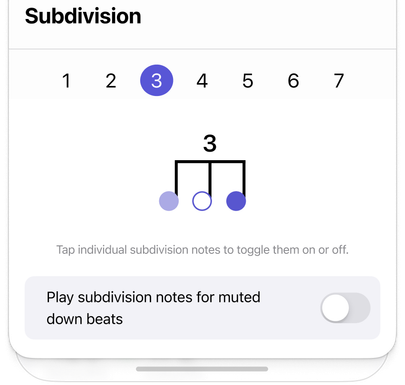
Choose how many notes play inside each beat, and Subdivide shows the subdivision as real notation so you always know what you're hearing.
-
1
Quarter notes
-
2
Eighth notes
-
3
Triplets
-
4
Sixteenth notes
-
5
Quintuplets
-
6
Sextuplets
-
7
Septuplets
Accents
Accent, normal, or mute on every beat
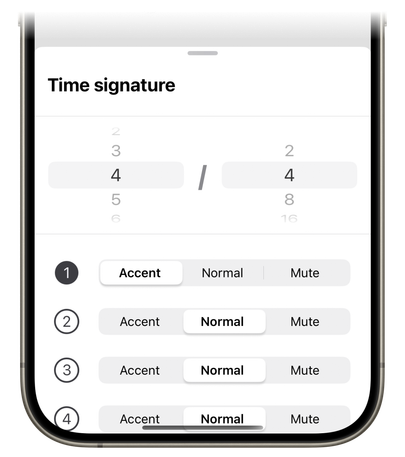
Tap the beat dots on the met to cycle each beat through accent, normal, and mute. Group a bar of 7/8 as 2+2+3 by accenting beats 1, 3, and 5, or mute beats 1 and 3 so the met only plays on 2 and 4.
Define both the top and bottom numbers of the time signature—anything from 1 to 16 beats over a half, quarter, eighth, or sixteenth note—and accents and subdivisions follow along.
Time signatures and precise tempo controlSubdivision muting
Mute the notes inside the beat
Silence any individual subdivision note, in the metronome and in your tracks. Play only the "e" and the "a" of a sixteenth-note group, or drop the middle of a triplet, and keep your rhythmic framework while you focus on the notes that are left. You can also choose whether subdivision notes keep playing on a muted downbeat.
Subdivision muting is part of Subdivide Pro.
Details
Everything else a metronome should do
-
Tap for tempo
Tap the BPM to set the tempo, or nudge it up or down one BPM at a time with the arrows beside the dial.
-
10 to 400 BPM
From a slow practice tempo to the fastest show on the field.
-
Presets
Save a tempo, time signature, subdivision, and accent pattern together, and switch between them in a tap.
-
Keeps playing with the screen off
The met keeps running in the background, with the tempo on your Lock Screen or Dynamic Island.
When the tempo or subdivision changes partway through the music, build a click track that changes with it.
Program the whole piecePracticing with subdivisions
What are subdivisions in music?
Subdivisions split a beat into smaller, evenly spaced parts. With a quarter-note beat in 4/4, two equal parts are eighth notes, three are eighth-note triplets, and four are sixteenth notes. A metronome with subdivisions makes those smaller pulses audible while you practice.
How do I practice with a subdivision metronome?
In 4/4, start slowly with the eighth note subdivision selected and count “1 and 2 and 3 and 4 and.” Play a short phrase until the notes sit evenly between beats. Then switch back to quarter notes at the same BPM and keep the in-between notes steady.
Are subdivisions free in Subdivide?
Yes. The metronome, subdivisions and per-beat accents are free. Muting individual notes within a subdivision is a Subdivide Pro feature.
Lock in your timing
The metronome is free on iPhone and iPad, subdivisions and accents included. Subdivision muting, the Classic Beat sound, tracks, and audio cues are part of Subdivide Pro. Try Pro free for a week, then $4.99/month or $29.99/year, cancel anytime—or buy it once for $44.99.