Sheet Music Scan
Turn sheet music into a click track
Skip the manual setup and go straight to practicing. Scan your sheet music—camera, photos, or a PDF—and Subdivide reads the tempos, time signatures, and bar counts, then builds a click track that follows the piece from the first bar to the last.

Part of Subdivide Pro, the metronome and click track app for iPhone and iPad. Try Pro free for a week, then $4.99/month or $29.99/year, cancel anytime—or buy it once for $44.99.
How it works
How a scan becomes a click track
-
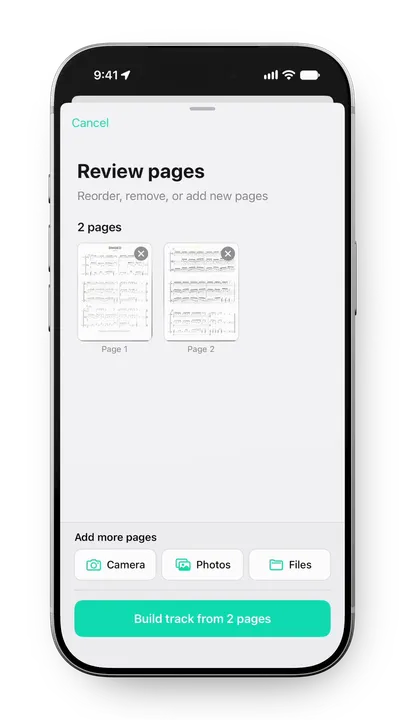
Step 1
Scan your pages
Use the camera, pick photos, or open a PDF from Files—up to 12 pages per scan. Add, remove, or reorder pages before Subdivide builds the track.
-
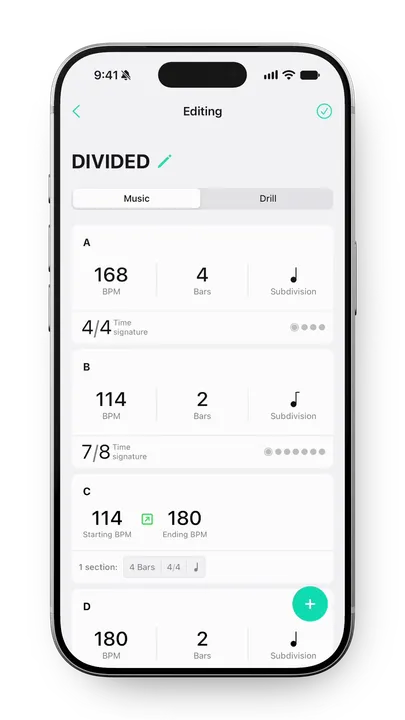
Step 2
Subdivide reads the music
Every tempo change, meter change, and repeat becomes a section of your track. An accelerando turns into a ramp across the bars it covers.
-
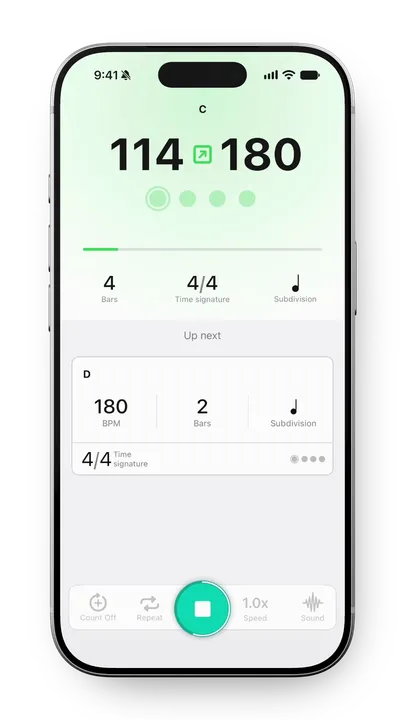
Step 3
Review and play
Give the sections a once-over against your music, then save. Everything stays editable, same as a track you built by hand.
What it reads
What Subdivide reads from your sheet music
-
Tempo markings
The BPM and which note gets the beat.
-
Time signatures
Every meter change, including cut time.
-
Bar counts
Multi-measure rests included.
-
Repeats and pickups
Repeat signs and pickup bars.
-
Accelerandos and ritardandos
And how many bars they stretch over.
-
The title
Your track is named after the piece.
After the scan
Work the tough passages
Once it's built, a scanned click track works like any other track in Subdivide.
- Start slow, work your way up. Slow the whole track down without rewriting your tempo map. Build confidence, then bring it up to speed.
- Loop and count off. Loop any section, count off into it, and run as many reps as you need.
- Share it with the ensemble. Send a link or put the QR code on a screen. Everyone rehearses with the same tempos and transitions—and anyone can play it, iPhone or not.
- Export the audio. Save your track as an audio file to share with students, bandmates, and friends.
Building a track by hand instead? How to practice music with tempo changes walks through it. Marching ensembles can also lay drill pages and counts over a scanned track.
Already have the score as MusicXML?
Skip the camera. Export MusicXML from MuseScore, Sibelius, Dorico, or
Finale and drop it into Subdivide, which reads it the same way it reads
a scan. It takes .musicxml, .xml, and compressed
.mxl files, and combines several files into one track when
each movement is its own file.
What happens to your pages
Subdivide uses AI to read your pages. They go to our server, which passes them to OpenAI. We delete them the moment the scan finishes; OpenAI keeps them for up to 30 days, then deletes them.
Your pages are only ever used to build your track—never to train AI models. We ask for your agreement before your first scan, and the privacy policy has the details.
Spend less time setting up, more time practicing
Sheet Music Scan is part of Subdivide Pro for iPhone and iPad. Try Pro free for a week, then $4.99/month or $29.99/year, cancel anytime—or buy it once for $44.99.